Imagine plugging your phone into its charger before going to bed, placing it beside you, and falling asleep.
It’s something millions of people do every night without thinking twice.
But what happens if your phone or charger starts overheating while you’re sleeping?
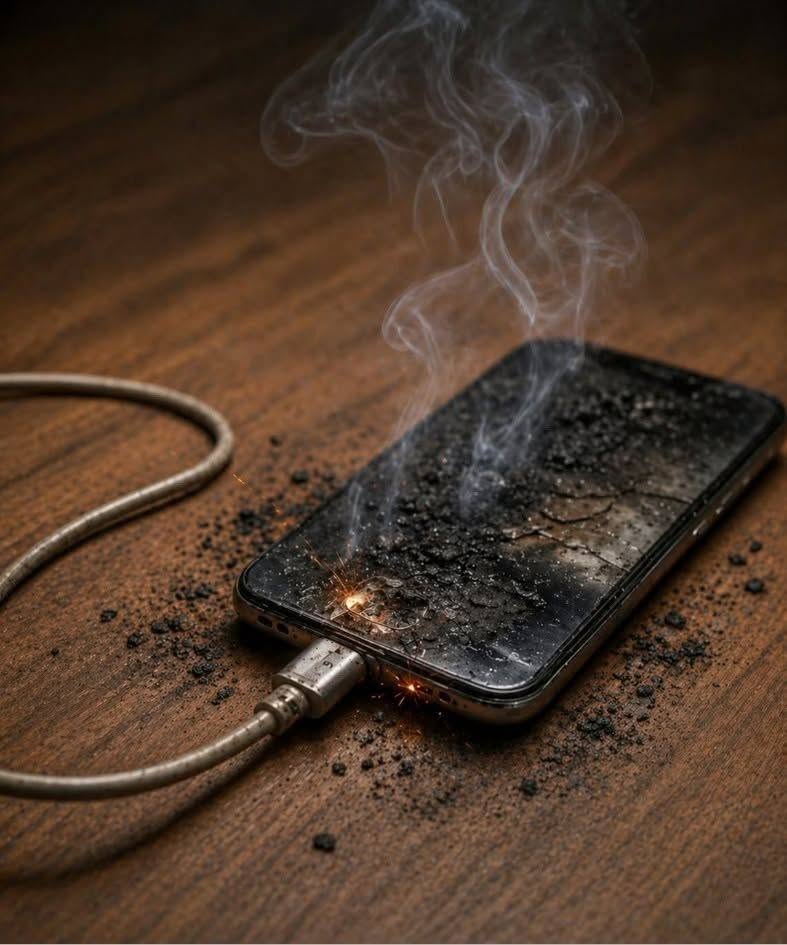
A frightening image circulating on social media shows a smartphone connected to a charging cable, with smoke rising from its damaged surface. The accompanying warning suggests that a common charging habit could lead to a dangerous accident.
Although the image alone doesn’t establish what caused the damage—or whether the scene is authentic—the safety concern behind it is real.
Lithium-ion batteries can overheat, and damaged batteries or charging equipment can sometimes cause fires.
Fortunately, most smartphones are designed with multiple safety features, and serious battery incidents are uncommon.
Understanding the most important charging precautions can help you reduce unnecessary risks.
Here are 10 charging mistakes worth avoiding, what actually causes smartphone overheating, and what to do if your phone starts smoking.
Why Can a Phone Overheat While Charging?
Most modern smartphones use rechargeable lithium-ion batteries.
These batteries store a considerable amount of energy in a compact space.
During charging, electrical energy is transferred into the battery through a charging system that regulates voltage, current, and temperature.
Some warmth during charging is normal.
However, excessive heat may develop because of:
- A damaged battery
- Faulty charging equipment
- Poor electrical connections
- Exposure to high temperatures
- Physical damage
- Manufacturing defects
- Internal electrical failures
In rare circumstances, a lithium-ion battery can experience a dangerous process called thermal runaway.
This happens when internal heat-generating reactions accelerate, potentially producing more heat, flammable gases, smoke, or fire.
It’s important to distinguish normal warmth from signs of a serious battery problem.
1. Charging Your Phone Under a Pillow or Blanket
One of the most important mistakes to avoid is covering your phone while it’s charging.
Some people place their phones beneath pillows, blankets, or bedding to keep them nearby.
But these materials can trap heat and prevent normal cooling.
If a device develops a fault, nearby combustible bedding can also increase the danger.
What to Do Instead
Place your phone on a stable, hard, uncovered surface with adequate airflow.
Keep it away from pillows, blankets, clothing, and other easily combustible materials.
A bedside table is generally a better location than a bed.
2. Using a Damaged Charging Cable
Charging cables can become damaged over time.
Repeated bending, pulling, twisting, or pressure can weaken their internal wiring and connectors.
Warning signs include:
- Frayed insulation
- Exposed wires
- Bent or broken connectors
- Discoloration
- Unusual heat near the connector
- Intermittent charging
- A burning smell
A damaged cable may create electrical or overheating hazards.
What to Do Instead
Replace visibly damaged cables rather than repairing them with tape.
Use compatible, good-quality charging accessories that meet applicable safety requirements.
3. Using a Faulty or Poorly Made Charger
Not all charging adapters offer the same level of quality or protection.
A well-designed charger includes electrical safety features intended to manage abnormal operating conditions.
Poorly manufactured, counterfeit, or defective chargers may lack adequate protection.
However, it’s important to understand that a charger doesn’t have to be made by the phone’s manufacturer to be safe.
A reputable third-party charger can be appropriate when it meets relevant safety standards and is compatible with the device.
What to Look For
Choose chargers from reputable manufacturers.
Check that the adapter is intended for your device and electrical system.
Avoid products with damaged housings, loose plugs, suspicious labeling, or obvious construction defects.
4. Leaving Your Phone in Direct Sunlight While Charging
Smartphones can become hot when exposed to direct sunlight.
Charging may generate additional heat.
Combining charging with a hot environment can cause the device to exceed its preferred operating temperature.
Examples include:
- Charging on a sunny windowsill
- Leaving a phone on a car dashboard
- Charging inside a hot parked vehicle
- Placing the phone near a heater
What to Do Instead
Charge your device in a cool, dry, well-ventilated location.
Follow the operating temperature guidance provided by its manufacturer.
If your phone displays a temperature warning, stop charging and allow it to cool naturally.
5. Ignoring a Swollen Battery
A swollen smartphone battery is a serious warning sign.
Lithium-ion batteries can swell when gases accumulate inside them.
You might notice:
- The screen lifting away from the frame
- The back cover bulging
- An unusual gap in the casing
- The phone no longer lying flat
- Visible deformation
What to Do Instead
Stop using and charging the device.
Do not puncture, squeeze, bend, or attempt to flatten the battery.
Do not attempt to remove a swollen built-in battery unless you are appropriately trained and equipped.
Arrange professional assessment and safe battery handling.
6. Charging Near Water or Moisture
Water and electricity are a dangerous combination.
Moisture inside a charging port can interfere with electrical connections and contribute to corrosion or damage.
Many modern phones can detect moisture in their charging ports and display a warning.
What to Do Instead
Keep charging equipment dry.
If your phone reports moisture in the charging port, disconnect the cable and follow the manufacturer’s drying instructions.
Avoid inserting metal objects, cotton swabs, or other items into the port.
Do not use a hair dryer or intense heat to speed up drying.
7. Ignoring Excessive Heat During Charging
It’s normal for some phones to feel slightly warm during charging, particularly when fast charging or running demanding applications.
But extreme heat is different.
Warning signs include:
- The device becoming unusually hot
- A strong chemical or burning smell
- Visible smoke
- Unusual hissing or popping
- Battery swelling
- Melting or discoloration around the charging port
If you notice these signs, stop using the device and prioritize safety.
If it is merely unusually warm, disconnect charging if safe and allow it to cool on a suitable surface.
If it is smoking, hissing, or burning, don’t handle it. Move away and contact emergency services.
8. Using the Wrong Charging Equipment
Many people assume that a charger with a higher advertised wattage automatically forces excessive power into a phone.
That isn’t generally how properly designed modern USB charging systems work.
Compatible devices and chargers negotiate or regulate power delivery.
For example, a phone that supports 20-watt charging can often be safely connected to a reputable higher-wattage USB-C charger, provided the equipment and charging protocol are compatible.
The phone draws or negotiates the power it supports.
The real concerns are incompatibility, damaged equipment, poor manufacturing quality, and electrical faults.
What to Do Instead
Follow the device manufacturer’s charging recommendations.
Use compatible charging standards and reputable equipment.
9. Continuing to Use a Phone After a Serious Impact
Dropping a phone doesn’t automatically make its battery dangerous.
However, severe physical damage can affect internal components, including the battery.
If a phone has been crushed, bent, punctured, or seriously damaged, its battery may no longer be safe.
What to Do Instead
Inspect the device for unusual deformation, swelling, heat, or other damage.
If you suspect battery damage, stop charging it and arrange professional inspection.
Don’t continue using a visibly damaged phone simply because it still turns on.
10. Ignoring Manufacturer Safety Warnings or Battery Recalls
Manufacturers sometimes issue safety notices or recalls for products with identified defects.
These notices may involve batteries, chargers, power banks, or other electrical equipment.
A recalled product may pose a risk even if it appears to work normally.
What to Do Instead
Pay attention to official safety notices for your device and accessories.
Follow recall instructions when applicable.
Don’t continue using a recalled battery or charger against the manufacturer’s safety guidance.
Is It Dangerous to Charge Your Phone Overnight?
This is one of the most common questions about smartphone charging.
The answer requires some context.
Charging a modern, undamaged smartphone overnight with compatible, good-quality equipment is generally considered a normal use case.
Modern phones have charging-management systems designed to regulate battery charging.
They do not simply continue forcing unrestricted energy into a fully charged battery.
However, overnight charging still requires sensible precautions.
Avoid charging under bedding, near combustible clutter, with damaged equipment, or in excessively hot conditions.
If your phone or battery is already showing signs of failure, don’t leave it charging unattended.
Can a Phone Catch Fire While You’re Sleeping?
Yes, battery fires can occur, although they are uncommon relative to the enormous number of smartphones in everyday use.
The consequences can be serious because a battery failure may release heat, smoke, and flammable gases.
The risk can become more dangerous if the device is surrounded by combustible materials.
That’s why charging location and equipment condition matter.
Does Fast Charging Damage Your Phone?
Fast charging can generate more heat than slower charging under some conditions.
However, phones designed to support fast charging use systems intended to manage power and temperature.
Using a compatible fast charger isn’t automatically unsafe.
The key is to use suitable equipment and avoid charging in excessively hot conditions.
If your phone repeatedly overheats, have it checked.
Can You Use Your Phone While It’s Charging?
Using a phone while charging is not inherently dangerous.
However, demanding activities such as gaming, video recording, or navigation may increase heat generation.
If the device becomes unusually hot, reduce the workload and allow it to cool.
Don’t ignore persistent overheating.
Is Wireless Charging Safer Than Cable Charging?
Both wireless and wired charging can be safe when used with appropriate equipment.
Wireless charging may produce additional heat because of energy losses during power transfer.
Metal objects or poorly aligned accessories can also interfere with charging.
Use compatible wireless chargers and follow the manufacturer’s instructions.
Neither method is completely free from electrical or battery-related risks.
What Should You Do if Your Phone Starts Smoking? 🚨
This is the most important part of the article.
If your smartphone begins releasing smoke, making unusual popping sounds, or showing signs of fire, treat the situation as an emergency.
Step 1: Do not pick up the smoking phone. A failing battery can release extremely hot gases and toxic fumes.
Step 2: Move away immediately. Warn others nearby and evacuate the area.
Step 3: Close doors behind you if it is safe. This may help slow the spread of smoke or fire.
Step 4: Call your local emergency services from a safe location. Explain that a lithium-ion battery or electronic device may be involved.
Step 5: Do not return to retrieve belongings. A damaged battery can reignite even after visible flames disappear.
If the phone is merely overheating but is not smoking, hissing, or burning, disconnect it from power only if you can do so safely without touching a dangerously hot or damaged device.
Do not attempt to dismantle, puncture, or repair a failing battery.
How to Recognize a Dangerous Battery Before It Fails
A smartphone battery may show warning signs before a serious incident.
Pay attention to:
- Unexpected swelling or bulging
- Unusual chemical odors
- Excessive heat
- Hissing or crackling
- Leaking
- Visible smoke
- Deformation of the phone’s casing
Not every battery failure provides an obvious warning.
However, recognizing these symptoms can help you respond sooner.
Can You Put a Hot Phone in the Refrigerator?
No.
Putting an overheating smartphone in a refrigerator or freezer is not a recommended cooling method.
Rapid temperature changes and condensation can damage electronic components.
If the phone is simply warm, disconnect it if appropriate and let it cool naturally in a suitable environment.
If it is smoking or showing signs of battery failure, evacuate and contact emergency services.
Does Charging to 100% Cause a Phone Fire?
Charging to 100% does not automatically cause a fire.
Modern smartphones have systems that regulate charging and protect the battery.
However, prolonged exposure to heat and spending excessive time at very high states of charge can contribute to long-term battery aging.
Some phones offer optimized charging or charging-limit features to help preserve battery health.
These features are useful for battery longevity, but they don’t replace basic electrical safety precautions.
Should You Unplug Your Phone After It Reaches 100%?
Unplugging a fully charged phone is a sensible habit, particularly when it is convenient.
However, leaving a properly functioning modern smartphone connected for a while after reaching full charge doesn’t automatically mean it will overcharge or catch fire.
The important factors include battery condition, charging equipment, ventilation, and temperature.
Follow the instructions provided by your device manufacturer.
Where Is the Safest Place to Charge Your Phone?
Choose a location that is:
- Dry
- Stable
- Well ventilated
- Away from direct sunlight
- Away from bedding and combustible materials
- Easy to access
Avoid placing charging equipment where it can be crushed, stepped on, or covered.
Keep chargers and cables away from water and excessive heat.
What About Charging Your Phone on a Wooden Table?
A wooden table is a firm, stable surface and is generally preferable to a pillow or mattress for ordinary charging.
However, wood is combustible.
It is not a fireproof surface, and placing a damaged or smoking device on wood does not make it safe.
If you suspect a serious battery fault, stop using the device and follow appropriate safety guidance.
Are Power Banks Dangerous?
Power banks also commonly use lithium-ion batteries.
They can be convenient, but they require similar precautions.
Avoid using a power bank that is:
- Swollen
- Cracked
- Leaking
- Unusually hot
- Producing strange odors
- Making abnormal noises
Don’t leave a power bank under bedding or exposed to high temperatures.
Choose reputable products and follow their instructions.
What Should You Do With an Old or Damaged Battery?
Lithium-ion batteries should not be placed in ordinary household trash or standard recycling bins.
Damaged batteries can cause fires during waste collection and processing.
Use an appropriate battery collection or recycling service that accepts the type and condition of your battery.
For swollen or otherwise damaged batteries, contact a qualified collection facility or the manufacturer for safe handling instructions.
7 Smartphone Charging Myths Explained
Myth 1: Every Cheap Charger Is Dangerous
Price alone doesn’t determine safety. Product quality, compatibility, and compliance with relevant safety standards matter more.
Myth 2: A Higher-Wattage Charger Always Damages Your Phone
A properly designed compatible charger doesn’t automatically force its maximum rated power into the phone.
Myth 3: Every Warm Phone Is About to Explode
Some warmth during charging is normal. Extreme heat, swelling, smoke, and unusual noises are much more concerning.
Myth 4: Charging Overnight Always Causes Overcharging
Modern smartphones use charging-management systems. Overnight charging isn’t automatically overcharging, although safe placement and equipment remain important.
Myth 5: You Must Completely Drain Your Battery Before Charging
Modern lithium-ion batteries don’t require routine full discharge before recharging.
Myth 6: A Swollen Battery Is Safe if the Phone Still Works
False. Swelling can indicate a serious battery problem and should not be ignored.
Myth 7: You Can Safely Repair a Damaged Battery Yourself
Puncturing or mishandling lithium-ion batteries can cause serious injury or fire. Battery repairs should be handled by appropriately trained professionals.
A Simple Charging Safety Checklist
Before plugging in your smartphone, ask yourself:
- Is the cable free from visible damage?
- Is the charger compatible and in good condition?
- Is the charging port dry?
- Is the phone free from swelling or deformation?
- Is the device away from pillows and blankets?
- Is the surrounding temperature reasonable?
- Is the charging location well ventilated?
These simple checks can help prevent avoidable problems.
Frequently Asked Questions
Can a phone explode while charging?
A lithium-ion battery can fail violently under certain conditions, although serious incidents are uncommon.
Is it safe to sleep beside a charging phone?
Keep the phone on a stable, uncovered surface rather than in your bed or beneath your pillow. Avoid sleeping directly on the device or charging cable.
Can a damaged charging cable cause a fire?
Yes. Damaged charging equipment can create electrical and overheating hazards.
Should I remove my phone case while charging?
Usually, a compatible case doesn’t need to be removed. However, if your phone becomes unusually warm, removing the case may help cooling when recommended by the manufacturer.
Is fast charging dangerous?
Compatible fast charging is a normal feature of many smartphones. Faulty equipment, battery damage, and excessive heat are more important concerns.
Why does my phone get hot when charging?
Charging generates some heat. Fast charging, demanding applications, high ambient temperatures, and poor ventilation can increase it.
What if my charging port smells burnt?
Stop using the charger and device. Have them inspected before attempting to charge again.
Can a phone battery catch fire after being dropped?
Severe physical damage can compromise a battery. A damaged device should be professionally assessed.
What should I do if my phone starts smoking?
Move away, evacuate, avoid inhaling fumes, and call local emergency services. Do not handle the smoking device.
Final Thoughts: One Small Charging Habit Can Make a Big Difference
The dramatic image of a smoking smartphone is a powerful reminder that charging safety matters.
However, it doesn’t prove that one particular charger, cable, or habit caused the damage.
Modern smartphones are generally designed to charge safely when used correctly.
The biggest preventable risks often involve damaged batteries, faulty charging equipment, excessive heat, and unsafe charging locations.
Never charge your phone beneath a pillow or blanket, never ignore a swollen battery, and never continue using a device that smells burnt, smokes, or becomes dangerously hot.
A few simple precautions can help protect your phone, your home, and the people around you.
Remember: A phone can be replaced. Your safety cannot. 🔥📱